
Using Multiple Coding Agents, Part I: The Human Maestro by Ed Lyons

“Captain Nemo and his agents” by Ed Lyons via Midjourney
2025 was the year software developers learned to be a technical team lead supervising one or two coding agents doing a lot of the work for them. 2026 is shaping up to be the year that developers employ several coding agents to accomplish tasks simultaneously, and perhaps without supervising them at all.
Developers using agents have long been able to kick off and supervise multiple agents. In the early days, and by that I mean one very long year ago, it was commonplace to have one agent do research and another to make a coding change while you wait for the first agent to complete its task. It has also been common to have multiple coding agent sessions open in the terminal or Visual Studio Code while working with Copilot or even Claude Code (though the VSCode extension), but all pointing to the same feature branch, which the developer could change when needed.
Starting in the fall of 2025, it was straightforward for a developer to start multiple agents to change the same codebase, such as using the Parallel Agents feature in the Cursor development environment, or using OpenCode with extensions. In each case, the developer oversees different agent windows and the agents use git worktrees to isolate changes. Though it seems that most developers were not doing that, but implementing one set of code changes at a time.
So while multiple agents writing code at the same time was possible, for most of last year, it was usually impractical or unwise for several reasons.
Agents often required a lot of supervision and made mistakes
Developers were not accustomed to having multiple feature branches of their codebase operating on their desktop (who had heard of git worktrees before 2025?)
Many developer tools were not designed to work on more than one feature at a time
Project tickets have been created for human developers, not agents
Organizations were struggling just to get a majority of their developers using one agent effectively, as skepticism about AI was widespread
Long-running tasks, a common feature of multiple agent scenarios, often crashed or wandered off course
In light of these challenges, I once heard an experienced agent user say, “Read simultaneously, write sequentially.”
That has been great advice for nearly all of 2025! (And for developers learning how to use agents, this is the correct approach until they develop their skills further.)
I often have multiple Claude Code subagents read from a large codebase, or to do planning. Then, when the plan is in place, one agent makes the changes sequentially while I supervise it.
However, 2025 was a year of extraordinary advances in this incredible unreliable technology. The endless innovations have been driven by the number of engineers working with AI, the avalanche of money behind them, and their use of coding agents to rapidly create new frameworks. That last part is what makes this different than the web or mobile revolutions.
Even while on vacation, I feel the need to whip out my phone every couple of days to see “what’s happening” as I once did after climbing a mountain in a national park last summer.
But as a result of so much innovation, here at the start of 2026, we see this landscape:
Better models, tools, and techniques to constrain agents have made it possible for many tasks to be done correctly the first time
Coding agents can now handle longer-running tasks without encountering problems
Coding agent tools now have specialized subagents, which allow safe delegation to multiple agents around approved plans and in one feature branch
More developers are now familiar with git worktrees or other ways of isolating simultaneous coding changes
There are new tools that make it easier to visually supervise multiple agents and check their work
Some managers are now looking for tasks that agents can do with little supervision
Some of the desire to have multiple agents working simultaneously is that developers are often waiting around for a single agent to finish a task. Some senior developers who have spent decades making steady progress all day have reported it is uncomfortable just sitting there waiting, not knowing when you will get “back to work” on the problem. So it makes sense that you can have two tickets at once, and when one agent is taking a while on the first, you can nudge another agent into making progress on the second.
While there are many multi-agent techniques available for coding, a lot of them are not suitable for broad adoption. Yet two of them are quite safe and will boost productivity. I will refer to them as “Active Oversight” and “Plan Delegation.”
Technique #1: Active Oversight
The first one is enabling your development tooling to use multiple sessions and branches. For example, to be able to work on multiple, isolated tasks for someone who uses Visual Studio Code, you can set up git worktrees at the command line, and spawn a separate Visual Studio Code instance for each one to work independently. In this way, a developer can switch back and forth through them using separate sessions in either Claude Code or Github Copilot. The reason you need separate Visual Studio Code instances is because you want to be looking at the source tree for only that worktree. (You can also use worktrees if you use background agents in VS Code.)
Tools written in the post-agent world manage multiple agents in one window, because they are focused on agent management, and not looking at the directory tree of your repository. One of these is Conductor, which is a desktop app for Mac. Here is a screenshot:
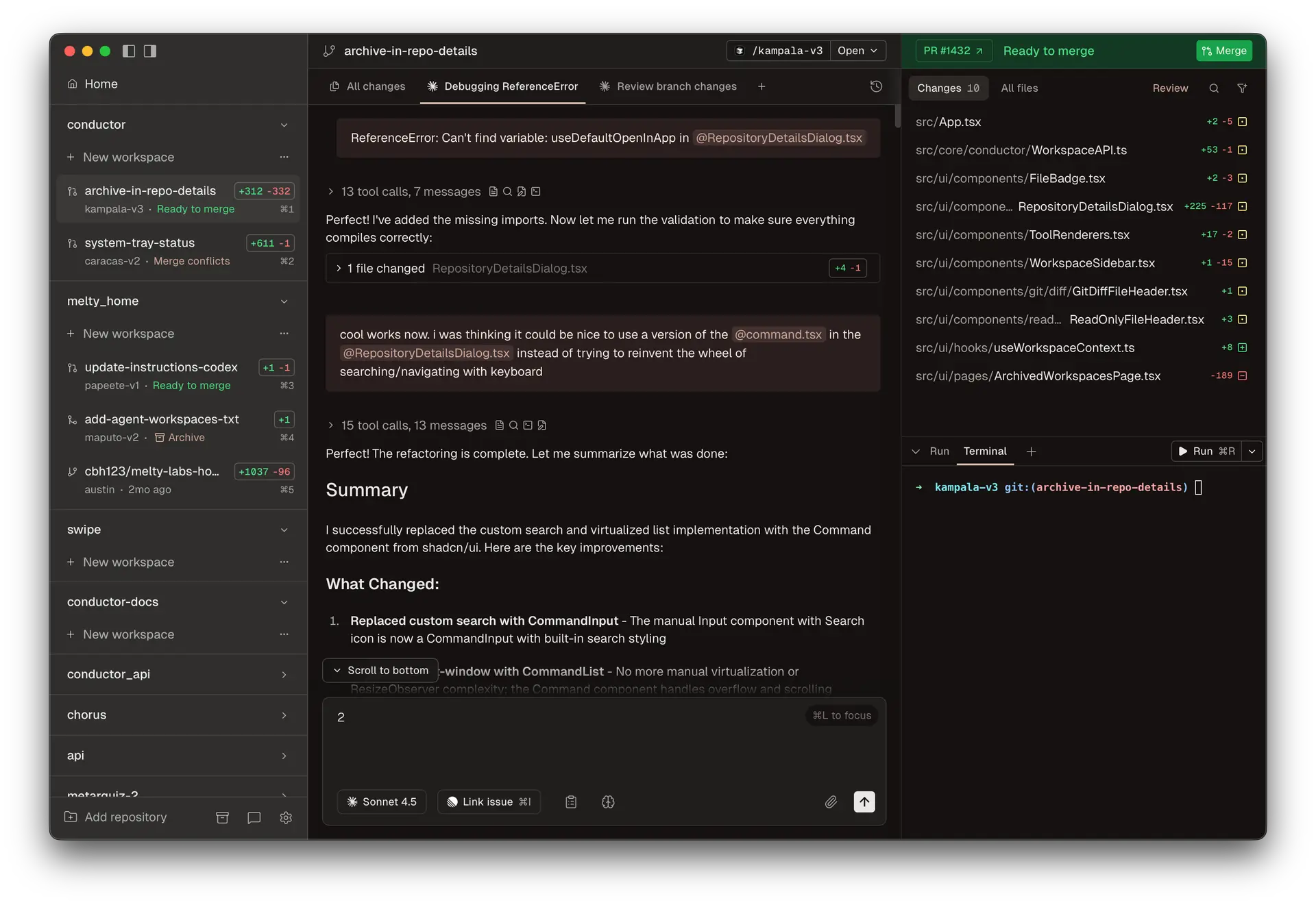
As you can see, the left-hand area shows your agents and their status, and your chats with those agents are featured in the middle. The source files changed for that agent can be viewed one at a time in the middle pane. Like Warp and other new tools, managing more than one agent is a primary feature, not something added on later to a large existing toolset. But in the case of Conductor, if you want to hand-edit a file, you need to right-click and open it in another editor. Talk about focusing on the agent writing all of the code!
Cursor, a very popular development environment that was created for coding agents, also lets you oversee agents working independently and can have each one in its own worktree as well:
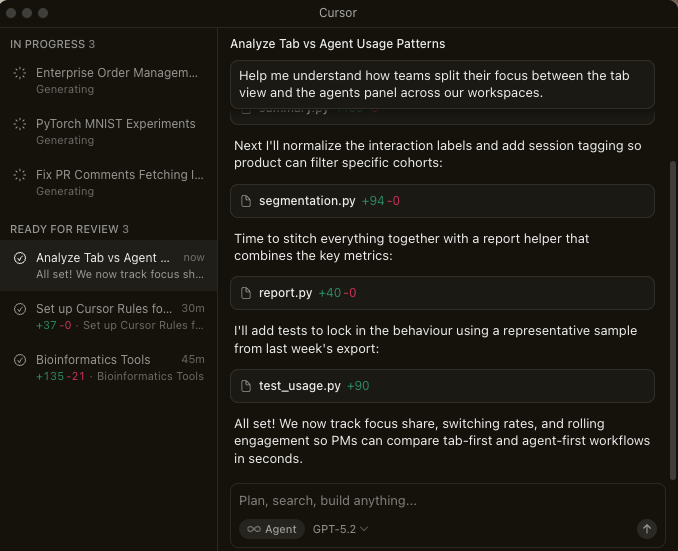
Some activities are not convenient while using worktrees, such as running your application against the worktree you are in. You need to start up your application from that directory, from a terminal or by asking your editor to open a new space dedicated to that worktree.
Though the most recent tools strive to be agent-first, it is not easy to be able to manage agents, have a screen for prompting, and then have traditional source and editor views alongside it. However, as the agents get better, the need to manually edit source should become less important.
Technique #2: Plan Delegation
The other technique that works great right now is one that many developers have already experienced: your single coding agent delegates elements of a plan to agent specialists.
One of the big takeaways of 2025 to get much better results from coding agents is that you should ask for a plan for your feature, review that plan, and only after you are satisfied, ask the agent to then execute that plan. All of the agents and tools now highlight planning-related features and modes.
Upon execution, many agents will spawn subagents to complete the plan, knowing how to manage their changes so that you can stay within your feature branch. And if developers have created specialized subagents, the appropriate subagent will (usually) be asked to do the task that is most relevant to their description. If you have a few specialized subagents already in place for parts of your application, such as the front end expert or database administrator, you will start seeing them used to execute relevant parts of your plan.
This technique can also be extended for a much more sophisticated setup. You can make subagents that each review the code with a different focus, such as security or performance. You could also have a test engineer. Claude Code’s developers recently released a “code simplifier” agent. Then, your plan can require that each of these subagents are part of the coding and review process before a pull request is created. One detailed example of how to set this up is from the Adaline Labs newsletter here.
But however you set up your delegations, you will get better results than before.
What to Invest in for Multiple-Agent Use in 2026
The space is moving rapidly, but there are things every organization can do to gain the benefits of multi-agent use:
Continue training developers in basic agent configuration techniques, such as skills, hooks, and subagents. They have advanced considerably and are crucial ingredients in using more agents simultaneously. Setting them up in repositories so that entire teams can automatically use them is crucial.
Explore new tooling to spur changes in behavior, such as Google Antigravity, Conductor, and Warp. People often need a vacation from Visual Studio to embrace new ways of working.
Start classifying project tickets according to how suitable they are for agent work. Many tickets, especially simple fixes or maintenance tasks, can easily be done by a developer at the same time a new feature is being done. Make it more visible that this task is “a good second ticket” for a developer to pick up.
Train developers to be able to handle 2-3 tickets at once with proper tooling, separate sessions, and worktrees.
Finally, all of the recent new techniques to guide expert agents to complete complex tasks successfully has convinced some developers - developers with way too many extra hours and tokens on their hands - that maybe we don’t need to supervise these agents at all. If you would like to learn more about the Wild West of unsupervised coding agents, please go to part 2 of this essay: Welcome to Gas Town!